Shogun: Optimizing pages with A/B testing
Making experimentation accessible to ecommerce merchants
Date: 2023 – 2024
My role: Staff Product Designer
Who I worked with: Director of Product, Sr. Engineering Manager, Engineering team
Barriers to A/B testing as identified by customers
1
Cost: Many A/B testing tools were priced for larger businesses and difficult to justify for small and mid-sized merchants.
2
Time: Setting up experiments often required significant effort before any insights could be gathered.
3
Technical complexity: Existing solutions frequently required developer involvement or specialized knowledge that many merchants lacked.
4
Uncertainty: Even when customers had access to testing tools, many weren't sure what they should be testing or how to design meaningful experiments.
As a result, important decisions about page design and content were often based on intuition, internal opinions, or industry best practices rather than customer behavior.
The opportunity
Our customers had already created and published many key pages for their stores within Shogun Page Builder. Rather than asking them to adopt another platform, learn another workflow, and manage another subscription, we saw an opportunity to bring experimentation directly into a tool they were already using on a regular basis.
By integrating A/B testing into Page Builder, we could dramatically reduce the barriers to getting started:

No additional platform to learn

No developer required to launch basic experiments

No need to recreate existing pages in a separate tool

A familiar workflow built on top of already-created pages
The problem
Through interviews and ongoing conversations with Shogun Page Builder customers, we found that many were eager to improve key business metrics such as conversion rate, click-through rate and revenue. There was a general understanding that testing different page designs, messaging and offers could help them make better decisions, but few were running structured experiments.
The issue wasn’t a lack of interest in experimentation, but rather a lack of accessibility. As a result, important decisions about page design and content were often based on intuition, internal opinions, or industry best practices rather than customer behavior.
Exploring solutions
Simplifying experiment setup
Quickly creating an A/B test for any page: A streamlined setup flow enabled customers to launch an experiment in just a few steps. Customers could select a page, define their test goal, configure traffic allocation, and estimate how long the test would need to run to achieve meaningful results all within a single screen. Then, page variants could be designed in the editor.
Showing variant tabs on all pages: We surfaced A/B testing directly within the page editing experience by displaying an “Original” tab and an “Add your first variant” tab on every page even when an A/B test had not been created. Clicking either tab opened the A/B testing panel and encouraged customers to start a test. Compared to a standalone toolbar button, this approach significantly improved both feature discovery and test creation.
Integrating experimentation into the page editing workflow: Customers could create and edit variants, adjust traffic allocation, and publish or end experiments directly within the editor. While the dashboard provided a broader view of in-progress tests, the in-editor experience made it easy to manage key test details while actively working on the page designs being tested.
Identifying opportunities for experimentation
Surfacing pages that could benefit from testing: Within the Page Builder dashboard, we highlighted pages that appeared to be underperforming – such as those with below-average conversion rates – to help merchants quickly identify areas where experimentation could have the greatest impact.
Prompt on publish: Publishing a change to a page was a natural moment to encourage experimentation. When customers attempted to publish updates to an existing live page, we offered the option to launch an A/B test instead, allowing them to validate the impact of their changes before rolling them out to all visitors.
Making results easy to understand
An intuitive dashboard: Once a test was running, customers needed a quick way to understand its progress and performance. The dashboard provided an at-a-glance view of key metrics, variant performance, and estimated time remaining, helping merchants monitor experiments without digging through complex analytics.
Detailed analytics: While high-level summaries helped merchants quickly identify winning and losing variants, many wanted a deeper understanding of how their pages were performing. Detailed analytics allowed customers to compare variants across a wide range of metrics (including conversion rate, click-through rate, bounce rate, sales, and revenue) helping them uncover the factors driving test outcomes and make more informed decisions.
At-a-glance performance insights: The in-editor test panel kept experiment results visible within the page-building workflow, giving merchants a quick snapshot of performance without leaving the editor. From a single view, they could compare variant performance, access detailed analytics for deeper investigation, and end a test or roll out a winning variant when ready to take action.
Reflection
- Customers enthusiastically adopted A/B testing within Page Builder, frequently citing its simplicity and ease of use compared to traditional experimentation platforms.
- Customer case studies demonstrated meaningful business impact. In one example, a merchant reported an 80% increase in conversion rate after testing and iterating on page changes.
- A/B testing drove increased signups and plan upgrades, validating strong demand for experimentation and optimization capabilities.
- The biggest success wasn't the feature itself—it was validating a broader market opportunity. The popularity of A/B testing within Page Builder ultimately led to the creation of a successful standalone Shopify app, proving that merchants were looking for a simpler, more approachable way to run experiments.
Overview
Shogun launched A/B testing as part of the Page Builder platform to help merchants optimize their storefronts through experimentation without the cost, complexity, and technical expertise often required by standalone testing platforms. I led the design of the feature from concept through launch, working closely with product and engineering to define the vision, design the end-to-end experimentation workflow, and create analytics experiences that helped customers confidently interpret results and make data-informed decisions.
Shogun: Optimizing pages with A/B testing
Making experimentation accessible to ecommerce merchants
Date: 2023 – 2024
My role: Staff Product Designer
Who I worked with: Director of Product, Sr. Engineering Manager, Engineering team
Barriers to A/B testing as identified by customers
1
Cost: Many A/B testing tools were priced for larger businesses and difficult to justify for small and mid-sized merchants.
2
Time: Setting up experiments often required significant effort before any insights could be gathered.
3
Technical complexity: Existing solutions frequently required developer involvement or specialized knowledge that many merchants lacked.
4
Uncertainty: Even when customers had access to testing tools, many weren't sure what they should be testing or how to design meaningful experiments.
As a result, important decisions about page design and content were often based on intuition, internal opinions, or industry best practices rather than customer behavior.
The opportunity
Our customers had already created and published many key pages for their stores within Shogun Page Builder. Rather than asking them to adopt another platform, learn another workflow, and manage another subscription, we saw an opportunity to bring experimentation directly into a tool they were already using on a regular basis.
By integrating A/B testing into Page Builder, we could dramatically reduce the barriers to getting started:

No additional platform to learn

No developer required to launch basic experiments
No need to recreate existing pages in a separate tool

A familiar workflow built on top of already-created pages
The problem
Through interviews and ongoing conversations with Shogun Page Builder customers, we found that many were eager to improve key business metrics such as conversion rate, click-through rate and revenue. There was a general understanding that testing different page designs, messaging and offers could help them make better decisions, but few were running structured experiments.
The issue wasn’t a lack of interest in experimentation, but rather a lack of accessibility. As a result, important decisions about page design and content were often based on intuition, internal opinions, or industry best practices rather than customer behavior.
Exploring solutions
Simplifying experiment setup
Quickly creating an A/B test for any page: A streamlined setup flow enabled customers to launch an experiment in just a few steps. Customers could select a page, define their test goal, configure traffic allocation, and estimate how long the test would need to run to achieve meaningful results all within a single screen. Then, page variants could be designed in the editor.
Showing variant tabs on all pages: We surfaced A/B testing directly within the page editing experience by displaying an “Original” tab and an “Add your first variant” tab on every page even when an A/B test had not been created. Clicking either tab opened the A/B testing panel and encouraged customers to start a test. Compared to a standalone toolbar button, this approach significantly improved both feature discovery and test creation.
Integrating experimentation into the page editing workflow: Customers could create and edit variants, adjust traffic allocation, and publish or end experiments directly within the editor. While the dashboard provided a broader view of in-progress tests, the in-editor experience made it easy to manage key test details while actively working on the page designs being tested.
Identifying opportunities for experimentation
Surfacing pages that could benefit from testing: Within the Page Builder dashboard, we highlighted pages that appeared to be underperforming – such as those with below-average conversion rates – to help merchants quickly identify areas where experimentation could have the greatest impact.
Prompt on publish: Publishing a change to a page was a natural moment to encourage experimentation. When customers attempted to publish updates to an existing live page, we offered the option to launch an A/B test instead, allowing them to validate the impact of their changes before rolling them out to all visitors.
Making results easy to understand
An intuitive dashboard: Once a test was running, customers needed a quick way to understand its progress and performance. The dashboard provided an at-a-glance view of key metrics, variant performance, and estimated time remaining, helping merchants monitor experiments without digging through complex analytics.
Detailed analytics: While high-level summaries helped merchants quickly identify winning and losing variants, many wanted a deeper understanding of how their pages were performing. Detailed analytics allowed customers to compare variants across a wide range of metrics (including conversion rate, click-through rate, bounce rate, sales, and revenue) helping them uncover the factors driving test outcomes and make more informed decisions.
At-a-glance performance insights: The in-editor test panel kept experiment results visible within the page-building workflow, giving merchants a quick snapshot of performance without leaving the editor. From a single view, they could compare variant performance, access detailed analytics for deeper investigation, and end a test or roll out a winning variant when ready to take action.
Reflection
- Customers enthusiastically adopted A/B testing within Page Builder, frequently citing its simplicity and ease of use compared to traditional experimentation platforms.
- Customer case studies demonstrated meaningful business impact. In one example, a merchant reported an 80% increase in conversion rate after testing and iterating on page changes.
- A/B testing drove increased signups and plan upgrades, validating strong demand for experimentation and optimization capabilities.
- The biggest success wasn't the feature itself—it was validating a broader market opportunity. The popularity of A/B testing within Page Builder ultimately led to the creation of a successful standalone Shopify app, proving that merchants were looking for a simpler, more approachable way to run experiments.
Overview
Shogun launched A/B testing as part of the Page Builder platform to help merchants optimize their storefronts through experimentation without the cost, complexity, and technical expertise often required by standalone testing platforms. I led the design of the feature from concept through launch, working closely with product and engineering to define the vision, design the end-to-end experimentation workflow, and create analytics experiences that helped customers confidently interpret results and make data-informed decisions.
Shogun: Optimizing pages with A/B testing
Making experimentation accessible to ecommerce merchants
Date:
2023 – 2024
My role:
Staff Product Designer
Who I worked with:
Director of Product, Sr. Engineering Manager, Engineering team
Barriers to A/B testing as identified by customers
1
Cost: Many A/B testing tools were priced for larger businesses and difficult to justify for small and mid-sized merchants.
2
Time: Setting up experiments often required significant effort before any insights could be gathered.
3
Technical complexity: Existing solutions frequently required developer involvement or specialized knowledge that many merchants lacked.
4
Uncertainty: Even when customers had access to testing tools, many weren't sure what they should be testing or how to design meaningful experiments.
As a result, important decisions about page design and content were often based on intuition, internal opinions, or industry best practices rather than customer behavior.

No additional platform to learn

No developer required to launch basic experiments

No need to recreate existing pages in a separate tool

A familiar workflow built on top of already-created pages
The problem
Through interviews and ongoing conversations with Shogun Page Builder customers, we found that many were eager to improve key business metrics such as conversion rate, click-through rate and revenue. There was a general understanding that testing different page designs, messaging and offers could help them make better decisions, but few were running structured experiments.
The issue wasn’t a lack of interest in experimentation, but rather a lack of accessibility. As a result, important decisions about page design and content were often based on intuition, internal opinions, or industry best practices rather than customer behavior.
The opportunity
Our customers had already created and published many key pages for their stores within Shogun Page Builder. Rather than asking them to adopt another platform, learn another workflow, and manage another subscription, we saw an opportunity to bring experimentation directly into a tool they were already using on a regular basis.
By integrating A/B testing into Page Builder, we could dramatically reduce the barriers to getting started:
Exploring solutions
Simplifying experiment setup
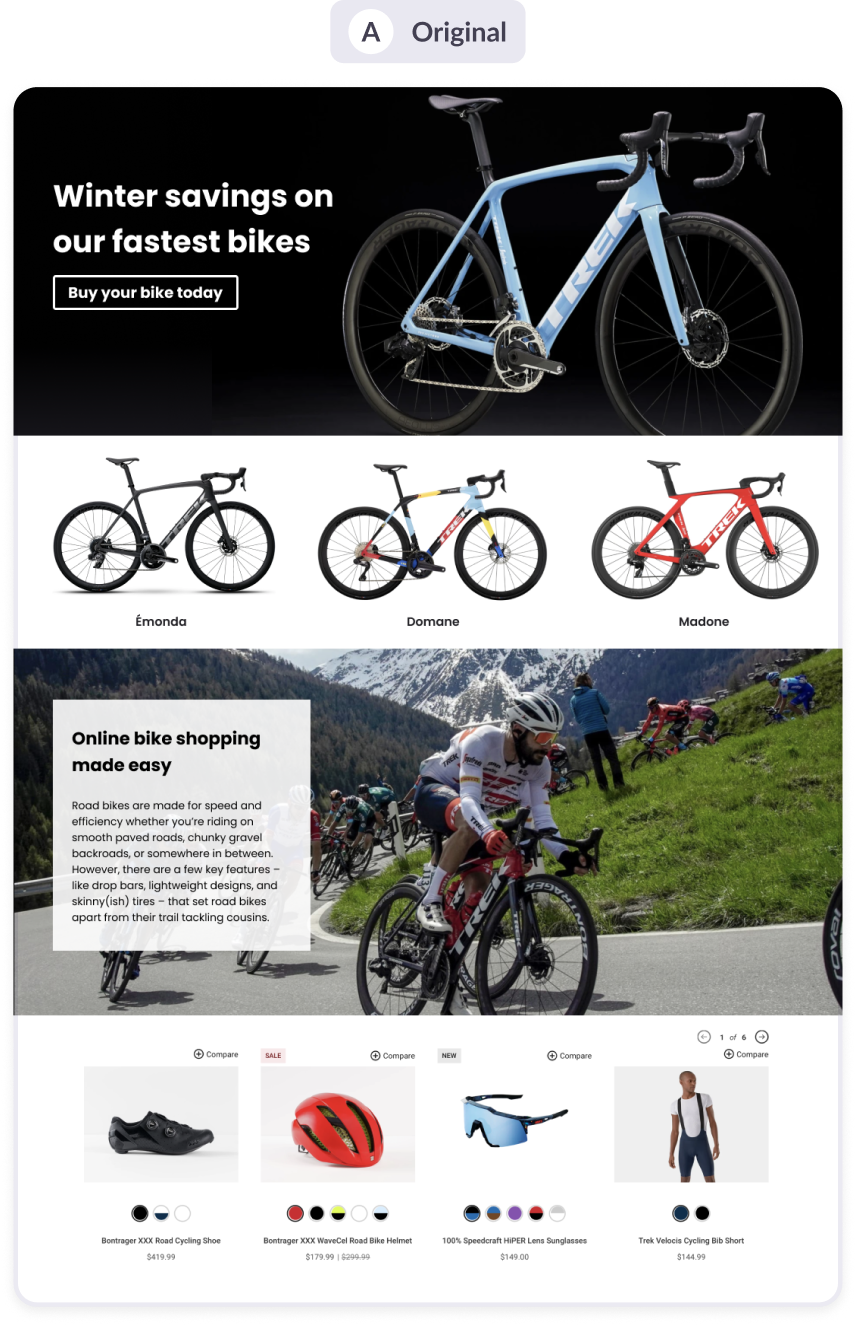
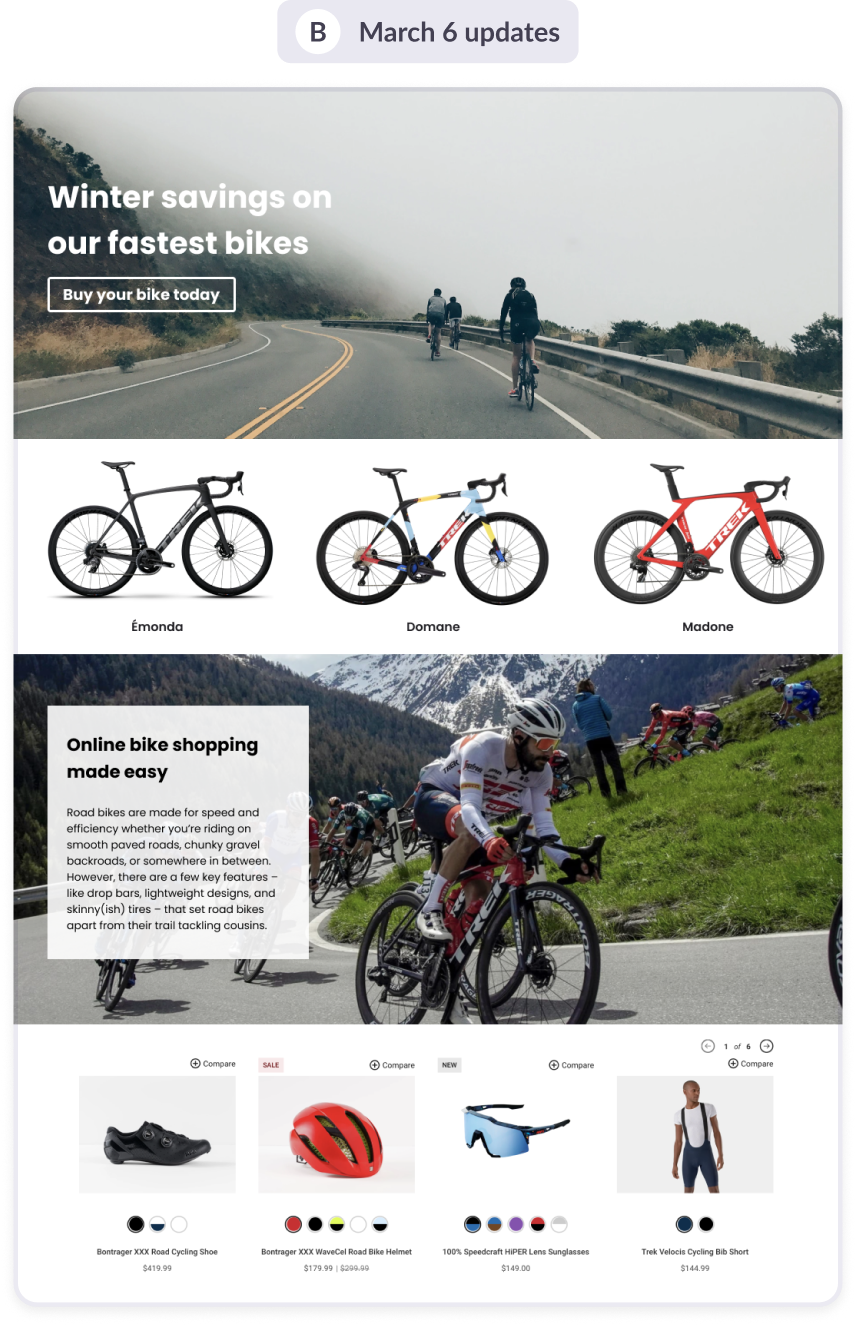
Quickly creating an A/B test for any page: A streamlined setup flow enabled customers to launch an experiment in just a few steps. Customers could select a page, define their test goal, configure traffic allocation, and estimate how long the test would need to run to achieve meaningful results all within a single screen. Then, page variants could be designed in the editor.
Showing variant tabs on all pages: We surfaced A/B testing directly within the page editing experience by displaying an “Original” tab and an “Add your first variant” tab on every page even when an A/B test had not been created. Clicking either tab opened the A/B testing panel and encouraged customers to start a test. Compared to a standalone toolbar button, this approach significantly improved both feature discovery and test creation.
Integrating experimentation into the page editing workflow: Customers could create and edit variants, adjust traffic allocation, and publish or end experiments directly within the editor. While the dashboard provided a broader view of in-progress tests, the in-editor experience made it easy to manage key test details while actively working on the page designs being tested.
Identifying opportunities for experimentation
Surfacing pages that could benefit from testing: Within the Page Builder dashboard, we highlighted pages that appeared to be underperforming – such as those with below-average conversion rates – to help merchants quickly identify areas where experimentation could have the greatest impact.
Prompt on publish: Publishing a change to a page was a natural moment to encourage experimentation. When customers attempted to publish updates to an existing live page, we offered the option to launch an A/B test instead, allowing them to validate the impact of their changes before rolling them out to all visitors.
Making results easy to understand
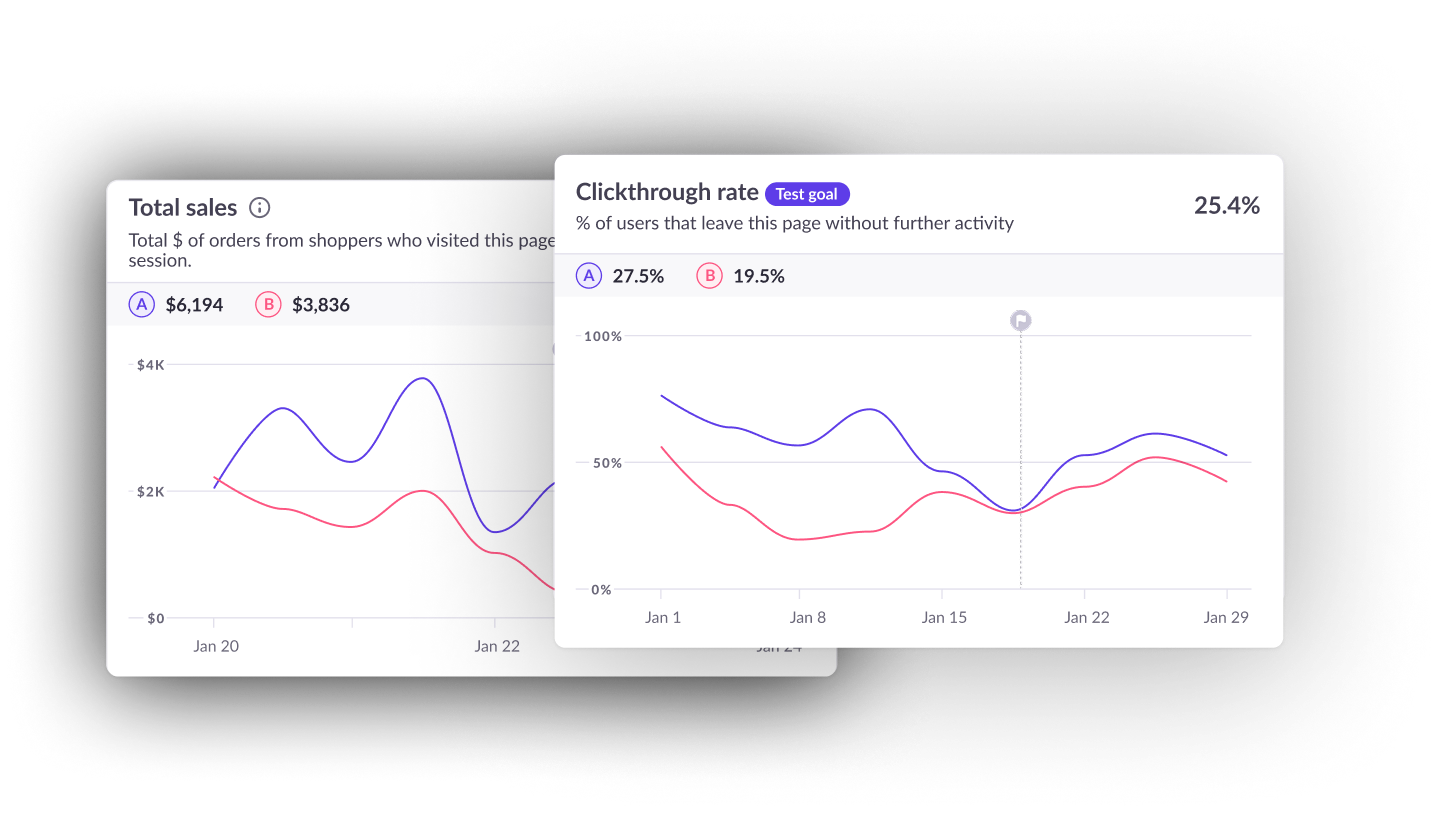
An intuitive dashboard: Once a test was running, customers needed a quick way to understand its progress and performance. The dashboard provided an at-a-glance view of key metrics, variant performance, and estimated time remaining, helping merchants monitor experiments without digging through complex analytics.
Detailed analytics: While high-level summaries helped merchants quickly identify winning and losing variants, many wanted a deeper understanding of how their pages were performing. Detailed analytics allowed customers to compare variants across a wide range of metrics (including conversion rate, click-through rate, bounce rate, sales, and revenue) helping them uncover the factors driving test outcomes and make more informed decisions.
At-a-glance performance insights: The in-editor test panel kept experiment results visible within the page-building workflow, giving merchants a quick snapshot of performance without leaving the editor. From a single view, they could compare variant performance, access detailed analytics for deeper investigation, and end a test or roll out a winning variant when ready to take action.
Reflection
- Customers enthusiastically adopted A/B testing within Page Builder, frequently citing its simplicity and ease of use compared to traditional experimentation platforms.
- Customer case studies demonstrated meaningful business impact. In one example, a merchant reported an 80% increase in conversion rate after testing and iterating on page changes.
- A/B testing drove increased signups and plan upgrades, validating strong demand for experimentation and optimization capabilities.
- The biggest success wasn't the feature itself—it was validating a broader market opportunity. The popularity of A/B testing within Page Builder ultimately led to the creation of a successful standalone Shopify app, proving that merchants were looking for a simpler, more approachable way to run experiments.
Overview
Shogun launched A/B testing as part of the Page Builder platform to help merchants optimize their storefronts through experimentation without the cost, complexity, and technical expertise often required by standalone testing platforms. I led the design of the feature from concept through launch, working closely with product and engineering to define the vision, design the end-to-end experimentation workflow, and create analytics experiences that helped customers confidently interpret results and make data-informed decisions.