Shogun: AI Section Builder
Helping merchants turn ideas into Shopify sections using AI
Date: Jun – Oct 2025
My role: Senior Staff Product Designer
Who I worked with: Senior Director of Design, Director of Product, Engineering team
Overview
AI Section Builder is a new product created to explore how generative AI could help Shopify merchants build and customize their storefronts without technical expertise. Rather than relying on developers or pre-built templates, merchants could describe what they wanted in plain language and instantly generate fully editable Shopify theme sections. I partnered closely with product and engineering from concept through launch to define the product vision and initial approach, navigate the unique challenges of designing for AI-generated visuals, and continuously iterate on, validate, and ship improvements.
The problem & opportunity
Shopify merchants regularly need to create new storefront experiences to support promotions, product launches, seasonal campaigns, and evolving business needs. While Shopify's theme editor makes it easy to customize existing content, creating entirely new sections often requires custom development work.
For many merchants, this creates a difficult tradeoff. They can hire a developer, purchase a pre-built template, or attempt to build something themselves. Each option requires compromises in cost, speed, flexibility, or technical complexity.
Creating a custom section: The existing workflow
1
Pay a developer to create a custom section
2
Describe or design exactly what you’re looking for
3
Wait days or weeks
4
Add the section to your store
5
Work with the developer any time you need to make a significant customization
Expensive and slow
OR
1
Find a template that’s close to what you need
2
Purchase and install it
3
Customize a section based on your needs
4
Discover it doesn’t quite match what you’re looking for
5
Hire a developer or compromise
Slow and frustrating
Advances in generative AI presented an opportunity to rethink this workflow entirely. Instead of searching for the right template or writing code, what if merchants could simply describe what they wanted and have a custom section generated for them?
How could we…
…help merchants communicate what they wanted in a way that produced useful results?
…let generated sections remain editable within Shopify's existing workflows?
…make AI-generated output feel trustworthy enough to use on a live storefront?
…balance the unpredictability of AI with the stability merchants expect?
…decide how much control merchants should have before and after generating sections?
Exploring solutions
Early exploration revealed that the challenge wasn’t just generating section designs with AI. Success depended on helping merchants express their intent, giving them control over the resulting output, and creating an experience they could trust. These principles shaped the product’s core design decisions.
Prompting AI to generate section designs
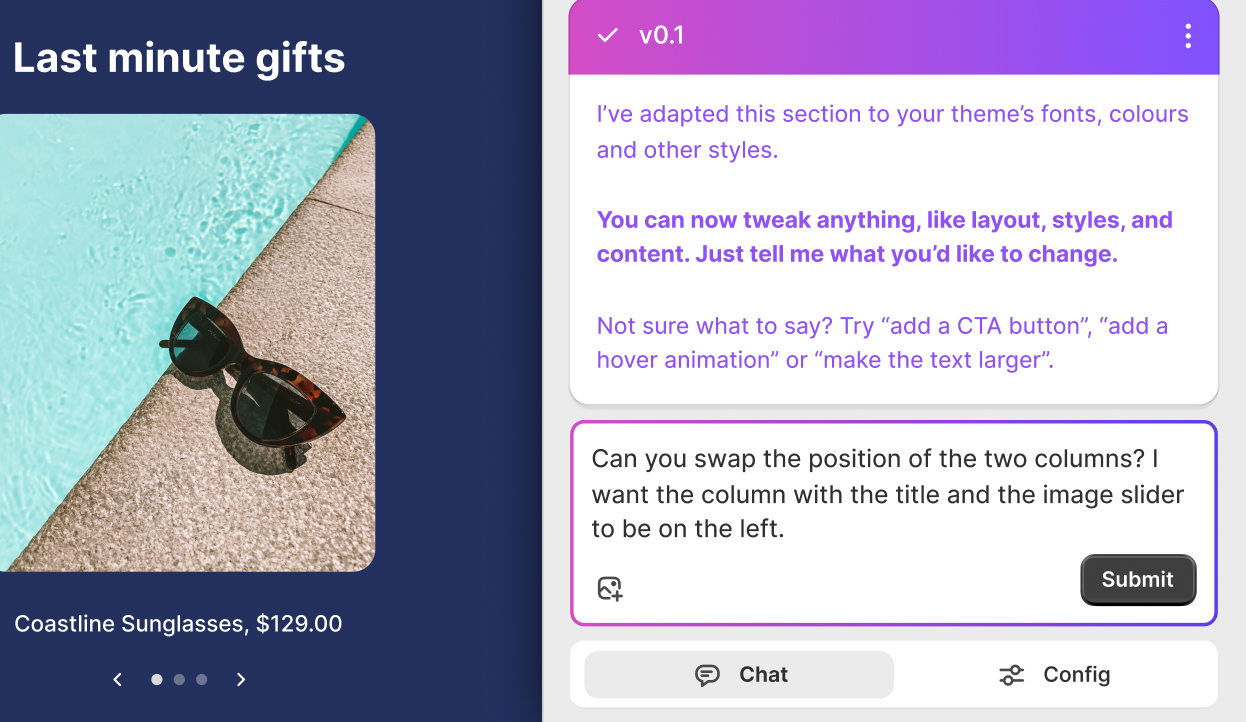
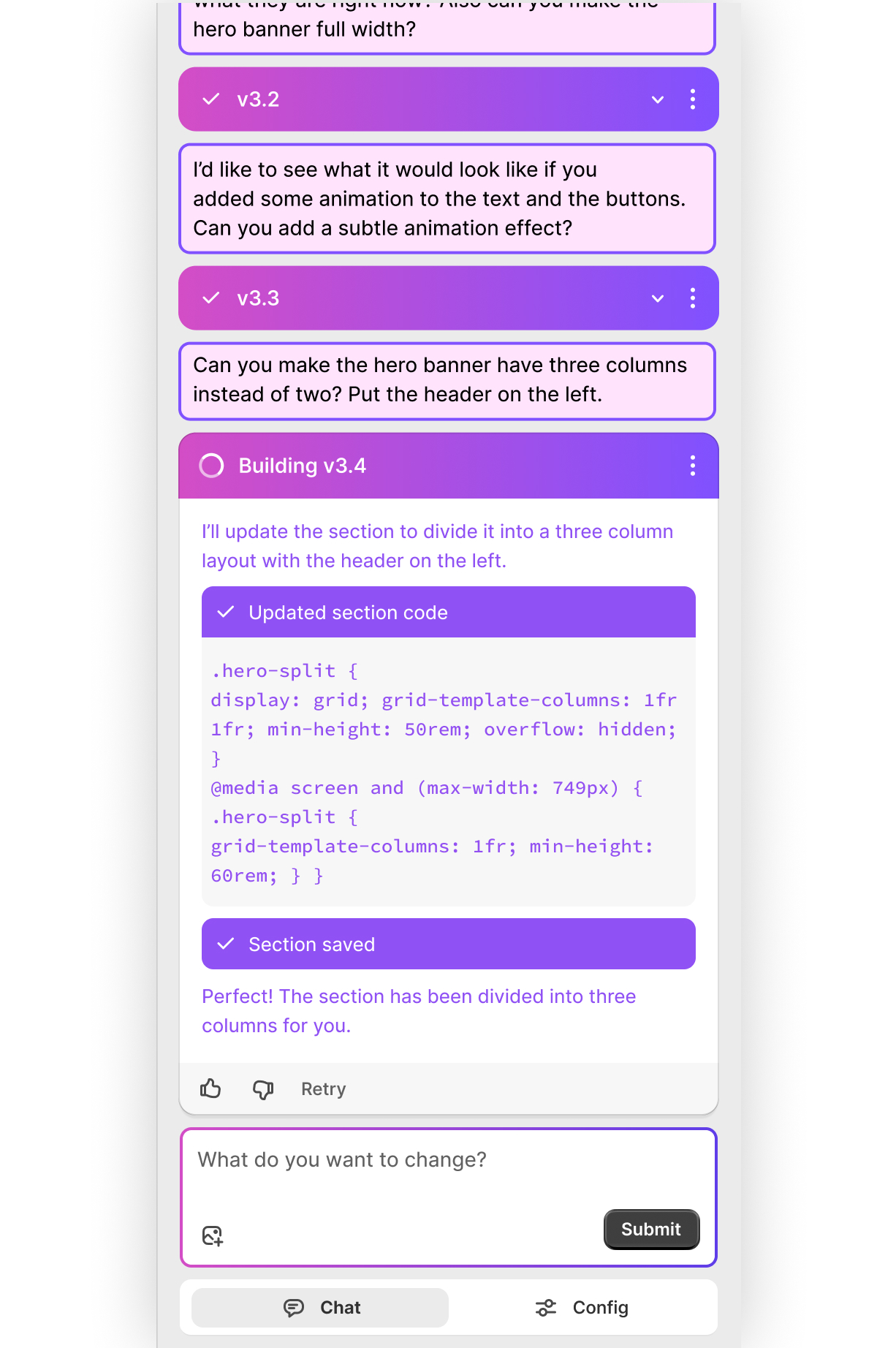
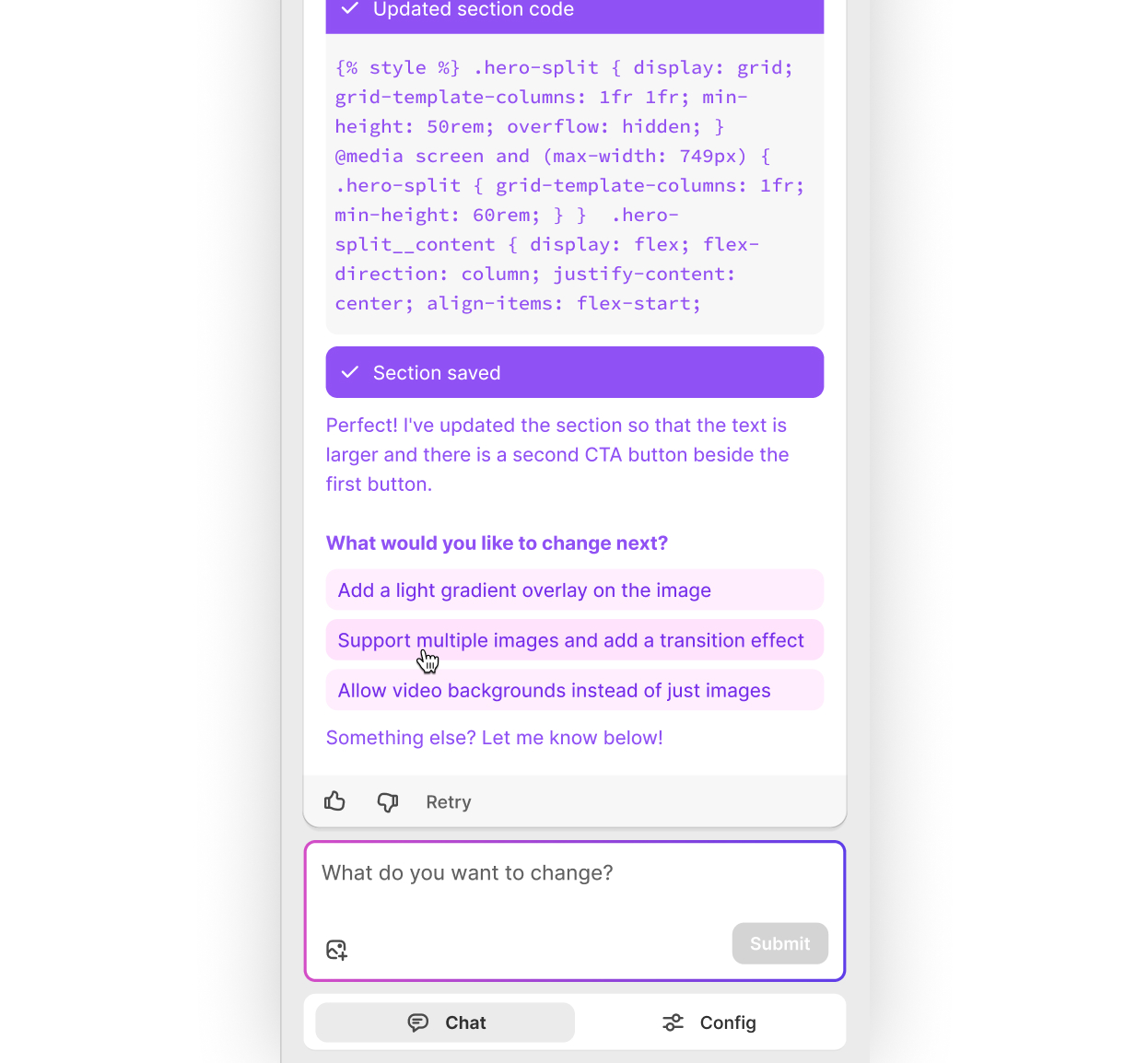
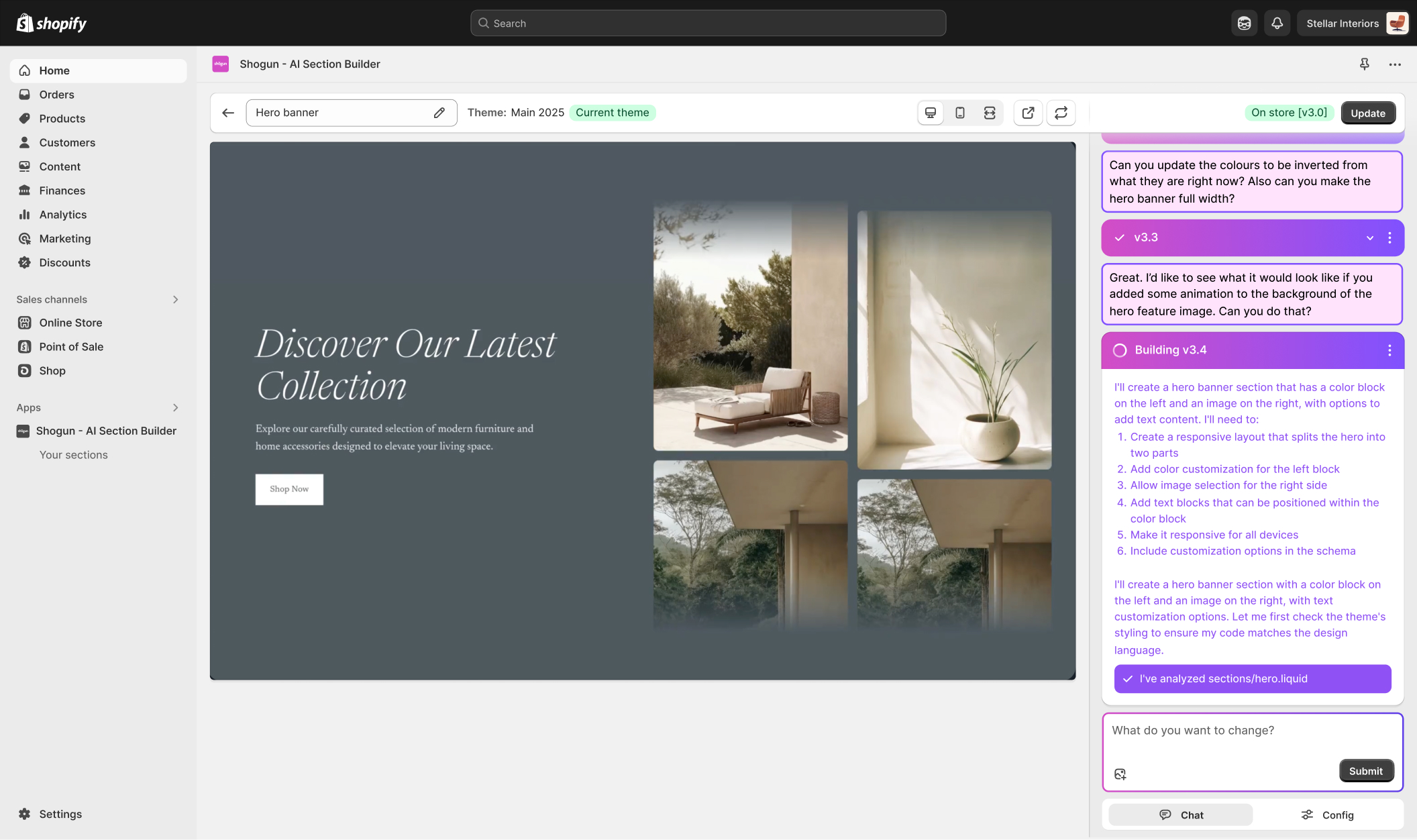
After writing an initial prompt on the dashboard or using a pre-made section as a starting point, customers modify their sections through a chat interface in the sidebar where they can ask for changes and see prompts around what to change next.
Enabling customizable sections
Once a desired design has been achieved, customers can ask AI to add or change customizable fields. Once a section is published to a Shopify store, these customizable fields can be configured every time the section is used in the store – for example, customizing the image and header shown in a hero banner for every collection page.
Making AI-generated sections feel predictable
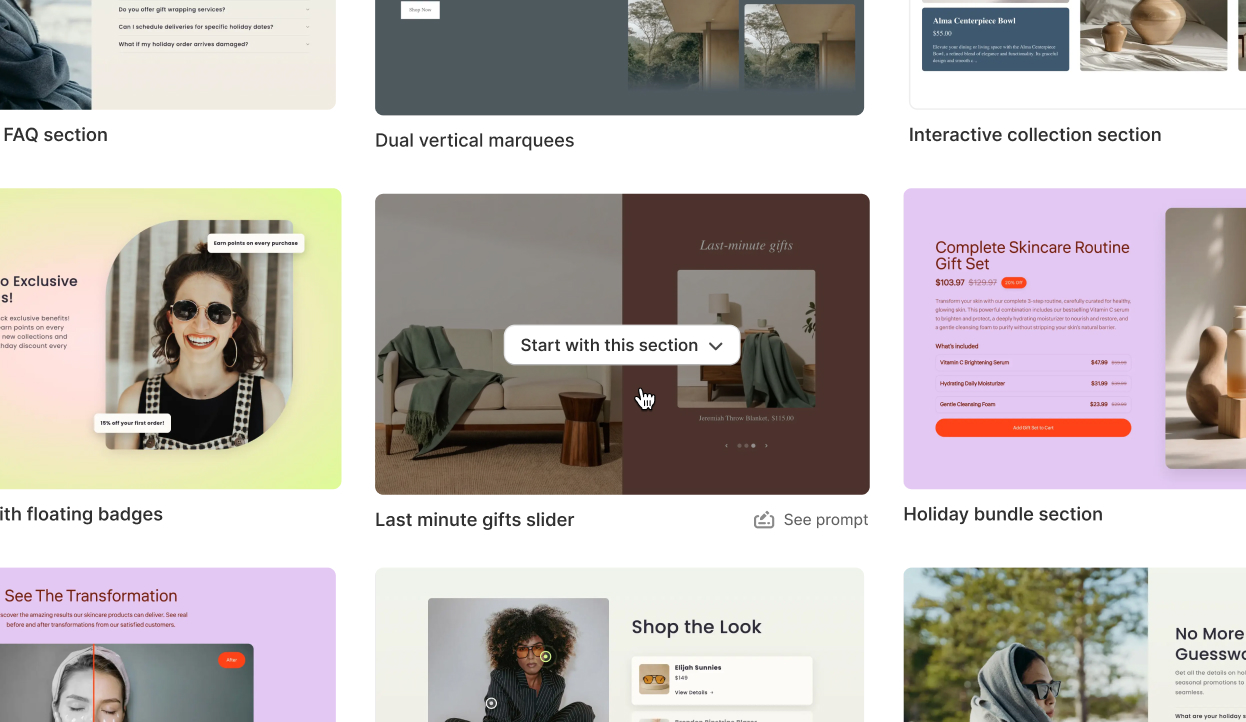
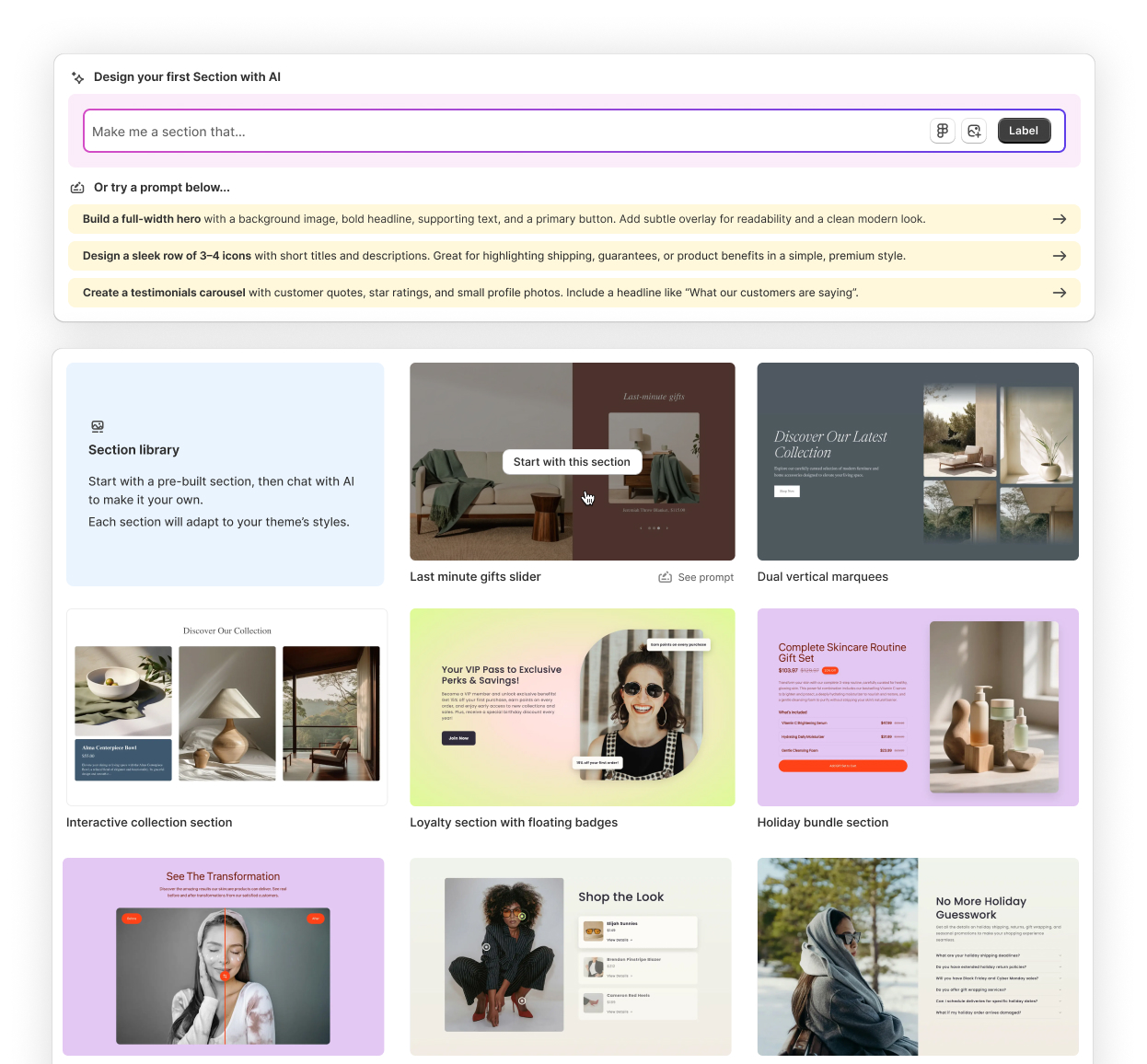
AI output can sometimes be unpredictable, and at times it can be challenging for customers not accustomed to crafting prompts to accurately describe a design. To help improve the predictability of creating a section, we decided to include a library of starting point designs to get customers heading in the right direction. That way, they can start by asking for changes to a design that already somewhat resembles what they’re going for, rather than starting from scratch every time.
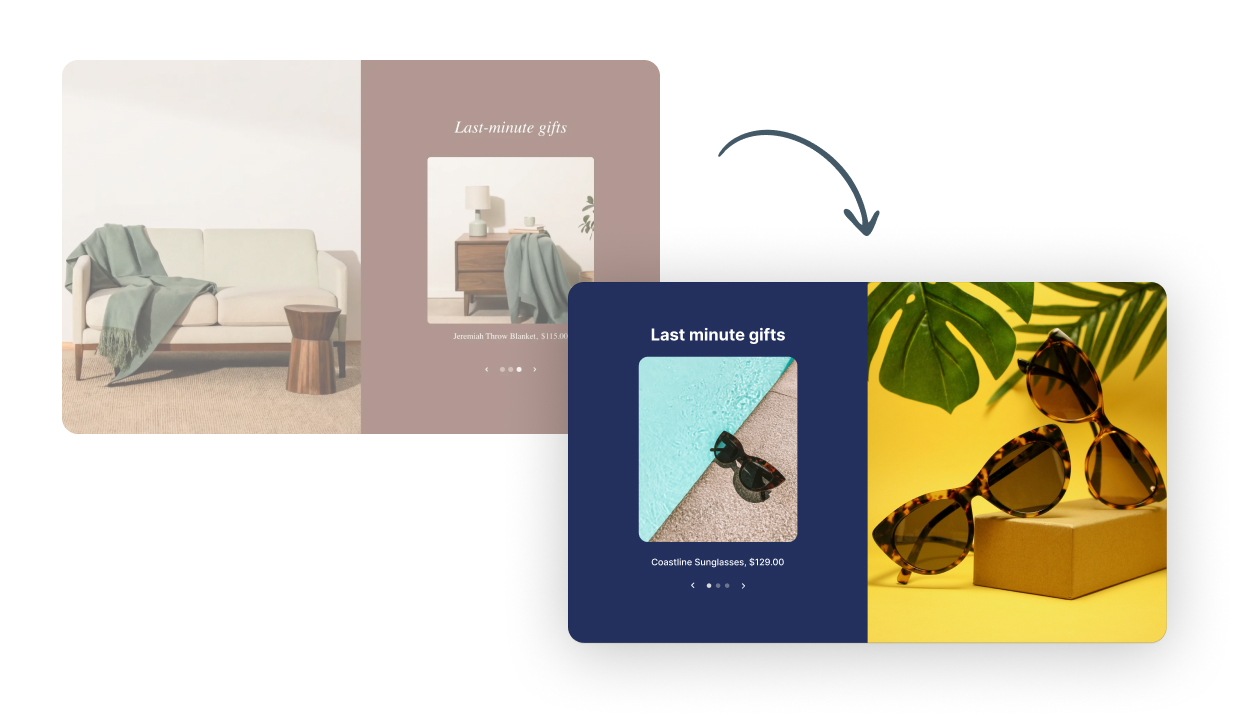
We also explored how customers could use a Figma design (or an image) as a starting point, giving them a straightforward bridge between the familiarity and precision of designing in Figma and the power to transform their design into a functioning, customizable Shopify section.
Reflection
Designing for uncertainty
One of the most interesting challenges was designing for a process that was inherently unpredictable. While the chat interface was simple, the generation pipeline behind it was anything but. We had to determine how to make a complex AI workflow feel understandable and trustworthy without exposing merchants to unnecessary technical detail.
This became especially important when handling failures. We continuously balanced transparency against user confidence, deciding when to surface issues and when to recover automatically behind the scenes. The experience reinforced that successful AI products depend as much on managing uncertainty as they do on the quality of the AI itself.
People need help getting started
During early testing, we observed that many merchants provided surprisingly little detail in their prompts. Requests such as “Make me a banner to promote a sale” were common, despite lacking information about content, layout, imagery, or desired outcomes. More detailed prompts consistently produced better and more predictable results, but many users didn't naturally approach the product that way.
This reinforced an important lesson: successful AI products can’t assume users know how to write effective prompts. Rather than expecting merchants to learn prompt engineering, we needed to guide them toward better inputs through examples, templates, and high-quality starting points. Helping users get started on the right foot often had a greater impact on success than improvements to the generation process itself.
Creating a custom section: The updated workflow
1
Describe to AI what you’re looking for in a section design – or use a starter section or an image to visually describe what you’re looking for
2
Chat with AI to refine the output and add customizable fields to the section
3
Publish the section to your Shopify theme
4
Use the section in your Shopify pages, making customizations to the areas you defined as customizable fields
Shogun: AI Section Builder
Helping merchants turn ideas into Shopify sections using AI
Date: Jun – Oct 2025
My role: Senior Staff Product Designer
Who I worked with: Senior Director of Design, Director of Product, Engineering team
Overview
AI Section Builder is a new product created to explore how generative AI could help Shopify merchants build and customize their storefronts without technical expertise. Rather than relying on developers or pre-built templates, merchants could describe what they wanted in plain language and instantly generate fully editable Shopify theme sections. I partnered closely with product and engineering from concept through launch to define the product vision and initial approach, navigate the unique challenges of designing for AI-generated visuals, and continuously iterate on, validate, and ship improvements.
The problem & opportunity
Shopify merchants regularly need to create new storefront experiences to support promotions, product launches, seasonal campaigns, and evolving business needs. While Shopify's theme editor makes it easy to customize existing content, creating entirely new sections often requires custom development work.
For many merchants, this creates a difficult tradeoff. They can hire a developer, purchase a pre-built template, or attempt to build something themselves. Each option requires compromises in cost, speed, flexibility, or technical complexity.
Creating a custom section: The existing workflow
1
Pay a developer to create a custom section
2
Describe or design exactly what you’re looking for
3
Wait days or weeks
4
Add the section to your store
5
Work with the developer any time you need to make a significant customization
Expensive and slow
OR
1
Find a template that’s close to what you need
2
Purchase and install it
3
Customize a section based on your needs
4
Discover it doesn’t quite match what you’re looking for
5
Hire a developer or compromise
Slow and frustrating
Advances in generative AI presented an opportunity to rethink this workflow entirely. Instead of searching for the right template or writing code, what if merchants could simply describe what they wanted and have a custom section generated for them?
How could we…
…help merchants communicate what they wanted in a way that produced useful results?
…let generated sections remain editable within Shopify's existing workflows?
…make AI-generated output feel trustworthy enough to use on a live storefront?
…balance the unpredictability of AI with the stability merchants expect?
…decide how much control merchants should have before and after generating sections?
Exploring solutions
Early exploration revealed that the challenge wasn’t just generating section designs with AI. Success depended on helping merchants express their intent, giving them control over the resulting output, and creating an experience they could trust. These principles shaped the product’s core design decisions.
After writing an initial prompt on the dashboard or using a pre-made section as a starting point, customers modify their sections through a chat interface in the sidebar where they can ask for changes and see prompts around what to change next.
Enabling customizable sections
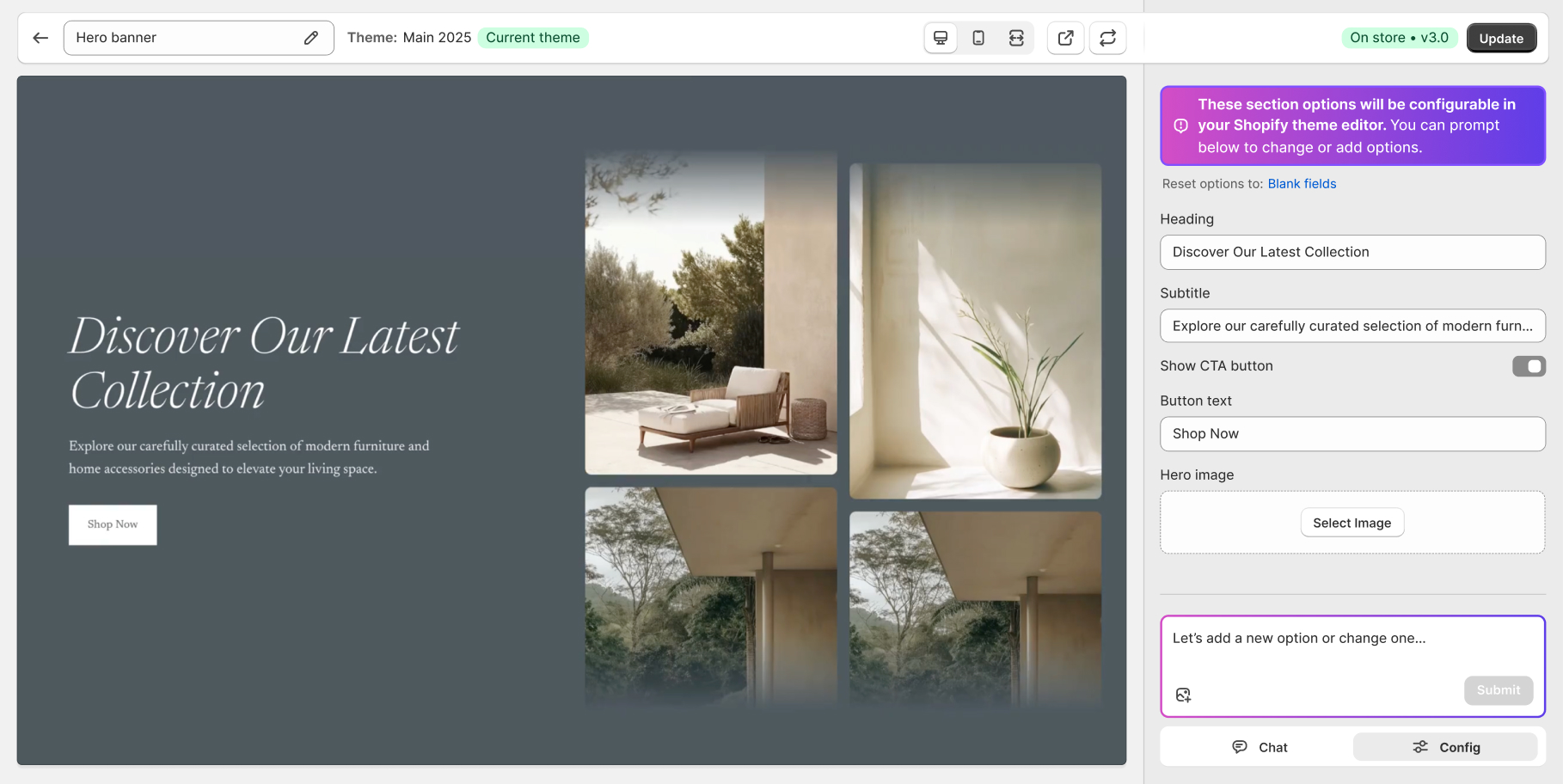
Once a desired design has been achieved, customers can ask AI to add or change customizable fields. Once a section is published to a Shopify store, these customizable fields can be configured every time the section is used in the store – for example, customizing the image and header shown in a hero banner for every collection page.
Making AI-generated sections feel predictable
AI output can sometimes be unpredictable, and at times it can be challenging for customers not accustomed to crafting prompts to accurately describe a design. To help improve the predictability of creating a section, we decided to include a library of starting point designs to get customers heading in the right direction. That way, they can start by asking for changes to a design that already somewhat resembles what they’re going for, rather than starting from scratch every time.
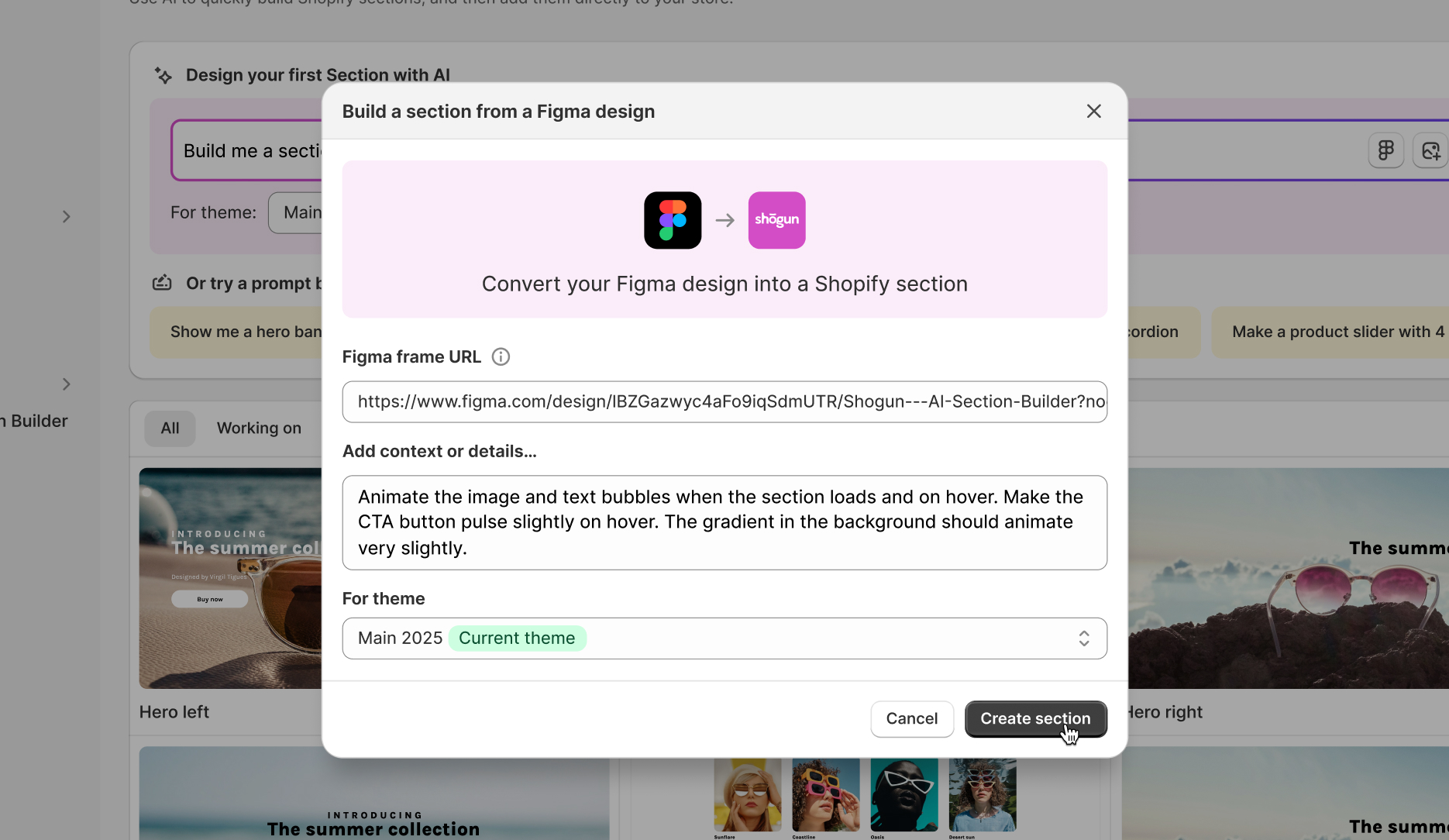
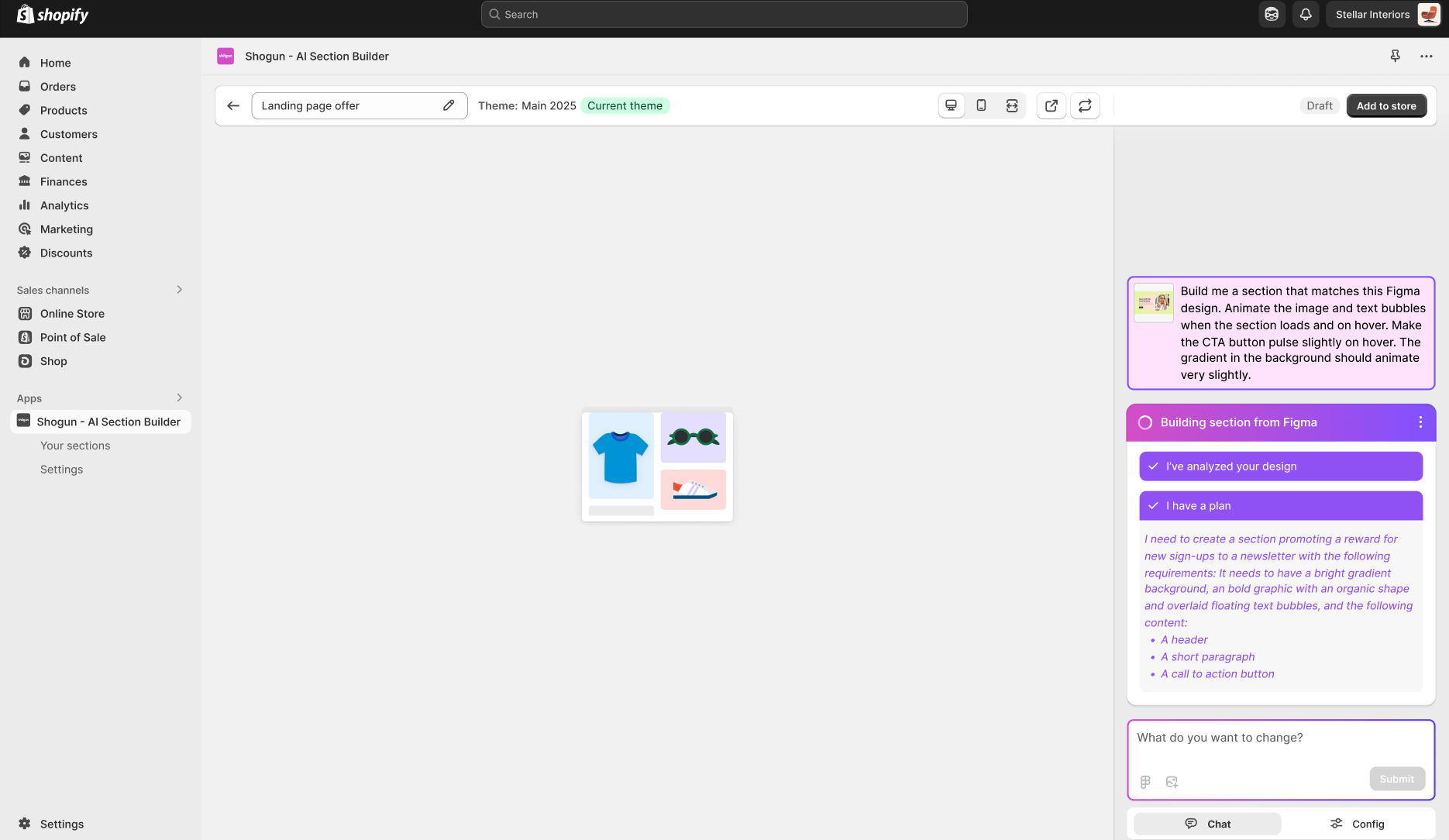
We also explored how customers could use a Figma design (or an image) as a starting point, giving them a straightforward bridge between the familiarity and precision of designing in Figma and the power to transform their design into a functioning, customizable Shopify section.
Reflection
Designing for uncertainty
One of the most interesting challenges was designing for a process that was inherently unpredictable. While the chat interface was simple, the generation pipeline behind it was anything but. We had to determine how to make a complex AI workflow feel understandable and trustworthy without exposing merchants to unnecessary technical detail.
This became especially important when handling failures. We continuously balanced transparency against user confidence, deciding when to surface issues and when to recover automatically behind the scenes. The experience reinforced that successful AI products depend as much on managing uncertainty as they do on the quality of the AI itself.
People need help getting started
During early testing, we observed that many merchants provided surprisingly little detail in their prompts. Requests such as “Make me a banner to promote a sale” were common, despite lacking information about content, layout, imagery, or desired outcomes. More detailed prompts consistently produced better and more predictable results, but many users didn't naturally approach the product that way.
This reinforced an important lesson: successful AI products can’t assume users know how to write effective prompts. Rather than expecting merchants to learn prompt engineering, we needed to guide them toward better inputs through examples, templates, and high-quality starting points. Helping users get started on the right foot often had a greater impact on success than improvements to the generation process itself.
Creating a custom section: The updated workflow
1
Describe to AI what you’re looking for in a section design – or use a starter section or an image to visually describe what you’re looking for
2
Chat with AI to refine the output and add customizable fields to the section
3
Publish the section to your Shopify theme
4
Use the section in your Shopify pages, making customizations to the areas you defined as customizable fields
Prompting AI to generate section designs
Shogun: AI Section Builder
Helping merchants turn ideas into Shopify sections using AI
Date:
Jun – Oct 2025
My role:
Senior Staff Product Designer
Who I worked with:
Senior Director of Design, Director of Product, Engineering team
Reflection
Designing for uncertainty
One of the most interesting challenges was designing for a process that was inherently unpredictable. While the chat interface was simple, the generation pipeline behind it was anything but. We had to determine how to make a complex AI workflow feel understandable and trustworthy without exposing merchants to unnecessary technical detail.
This became especially important when handling failures. We continuously balanced transparency against user confidence, deciding when to surface issues and when to recover automatically behind the scenes. The experience reinforced that successful AI products depend as much on managing uncertainty as they do on the quality of the AI itself.
People need help getting started
During early testing, we observed that many merchants provided surprisingly little detail in their prompts. Requests such as “Make me a banner to promote a sale” were common, despite lacking information about content, layout, imagery, or desired outcomes. More detailed prompts consistently produced better and more predictable results, but many users didn't naturally approach the product that way.
This reinforced an important lesson: successful AI products can’t assume users know how to write effective prompts. Rather than expecting merchants to learn prompt engineering, we needed to guide them toward better inputs through examples, templates, and high-quality starting points. Helping users get started on the right foot often had a greater impact on success than improvements to the generation process itself.
Exploring solutions
Early exploration revealed that the challenge wasn’t just generating section designs with AI. Success depended on helping merchants express their intent, giving them control over the resulting output, and creating an experience they could trust. These principles shaped the product’s core design decisions.
After writing an initial prompt on the dashboard or using a pre-made section as a starting point, customers modify their sections through a chat interface in the sidebar where they can ask for changes and see prompts around what to change next.
Once a desired design has been achieved, customers can ask AI to add or change customizable fields. Once a section is published to a Shopify store, these customizable fields can be configured every time the section is used in the store – for example, customizing the image and header shown in a hero banner for every collection page.
AI output can sometimes be unpredictable, and at times it can be challenging for customers not accustomed to crafting prompts to accurately describe a design. To help improve the predictability of creating a section, we decided to include a library of starting point designs to get customers heading in the right direction. That way, they can start by asking for changes to a design that already somewhat resembles what they’re going for, rather than starting from scratch every time.
We also explored how customers could use a Figma design (or an image) as a starting point, giving them a straightforward bridge between the familiarity and precision of designing in Figma and the power to transform their design into a functioning, customizable Shopify section.
How could we…
…help merchants communicate what they wanted in a way that produced useful results?
…let generated sections remain editable within Shopify's existing workflows?
…balance the unpredictability of AI with the stability merchants expect?
…make AI-generated output feel trustworthy enough to use on a live storefront?
…decide how much control merchants should have before and after generating sections?
Prompting AI to generate section designs
Creating a custom section: The existing workflow
1
Pay a developer to create a custom section
2
Describe or design exactly what you’re looking for
3
Wait days or weeks
4
Add the section to your store
5
Work with the developer any time you need to make a significant customization
Expensive and slow
OR
1
Find a template that’s close to what you need
2
Purchase and install it
3
Customize a section based on your needs
4
Discover it doesn’t quite match what you’re looking for
5
Hire a developer or compromise
Slow and frustrating
Creating a custom section: The updated workflow
1
Describe to AI what you’re looking for in a section design – or use a starter section or an image to visually describe what you’re looking for
2
Chat with AI to refine the output and add customizable fields to the section
3
Publish the section to your Shopify theme
4
Use the section in your Shopify pages, making customizations to the areas you defined as customizable fields
The problem & opportunity
Shopify merchants regularly need to create new storefront experiences to support promotions, product launches, seasonal campaigns, and evolving business needs. While Shopify's theme editor makes it easy to customize existing content, creating entirely new sections often requires custom development work.
For many merchants, this creates a difficult tradeoff. They can hire a developer, purchase a pre-built template, or attempt to build something themselves. Each option requires compromises in cost, speed, flexibility, or technical complexity.
Advances in generative AI presented an opportunity to rethink this workflow entirely. Instead of searching for the right template or writing code, what if merchants could simply describe what they wanted and have a custom section generated for them?
Overview
AI Section Builder is a new product created to explore how generative AI could help Shopify merchants build and customize their storefronts without technical expertise. Rather than relying on developers or pre-built templates, merchants could describe what they wanted in plain language and instantly generate editable Shopify theme sections. I partnered closely with product and engineering from concept through to launch to define the product vision and initial approach, navigate the unique challenges of designing for AI-generated visuals, and continuously iterate on, validate, and ship improvements.
Enabling customizable sections
Making AI-generated sections feel predictable